Equipment

Contents
Clicking on an Equipment Record from the Document Tree opens the Equipment view with the Faults section expanded. Clicking on a Fault from the list will bring up the Fault details screen where information can be modified as required.
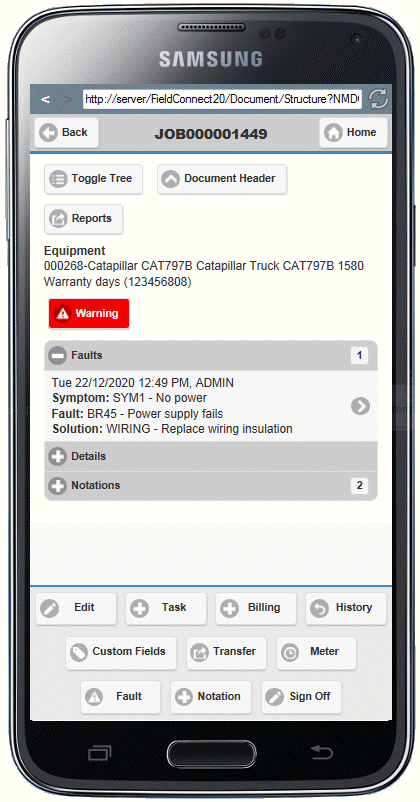
Other sections of the Equipment view include:
• Details - The Details section contains the same Equipment information as the Details Tab of V/M Document Entry including manufacturer and model codes, model description, equipment number, warranty end date, serial number, reported problem field.
•Notations - Existing Equipment notations are listed and can be selected to open the Edit Notation screen
The footer of the Phase section contains buttons to:
•Edit - Opens the Edit Equipment screen where details can be modified.
•Task - Opens the Add Task screen where a Task Billing line can be entered and saved under the Equipment record.
•Billing - Opens the Add Billing Group screen where a description can be entered and the new Billing Group saved.
•History - Opens the Equipment History screen
•Custom Fields - Display the Equipment's Custom Fields
•Transfer - Transfer the Equipment from one site to another
•Meter - Add a meter reading for the Equipment
•Fault - Add a new fault to the Equipment to appear in the Fault section of the Equipment View.
•Notation - Opens the Add Notation screen where a new Notation can be inserted at the Equipment level.
•Sign Off - Opens the Sign Off screen where status can be updated and comments left about the Job.